I removed Google Analytics rather than implement consent mode, and the tag is still live
What consent mode v2 requires of a one-person EU site, what running it properly costs, and the least flattering part of my own reasoning.

On this page
I took the Google Analytics tag out of this build rather than implement consent mode on it. What follows is the whole of that reasoning, in the order I worked through it, ending with the least flattering part: as I write, the tag is still live on the deployed site.
Start from the consequence, because the consequence is the part nobody argues about. Send Google no consent signal for a visitor in the EEA and that visitor stops appearing in the audiences your linked advertising products use. Not fined. Subtracted.
That has been the arrangement since early March 2024, Google documents it in plain words, and it changes what kind of question this is. Consent mode gets written about as a compliance feature. It behaves like a data-loss mechanism with a legal trigger bolted on, which is why the decision a small site actually faces (whether to run the tag at all) is not the same decision as configuring it correctly.
The legal shape, in two sentences
Two instruments apply and people routinely conflate them.
The ePrivacy Directive governs putting things onto, or reading things off, a visitor’s device. Article 5(3) of the consolidated text says that storing information, or gaining access to information already stored, in a user’s terminal equipment “is only allowed on condition that the subscriber or user concerned has given his or her consent”, with a carve-out for whatever is strictly necessary to deliver the service the user asked for.
Analytics is not strictly necessary to deliver a blog post.
The EDPB’s Guidelines 2/2023 on the technical scope of Article 5(3), version 2.0, adopted 16 October 2024, exist largely because people read “cookie law” as “law about cookies.” The article is about storage and access on a device. The mechanism is irrelevant to it.
The GDPR then governs what counts as consent, and what you may do with the personal data afterwards. Article 4(11) defines consent as a “freely given, specific, informed and unambiguous indication of the data subject’s wishes by which he or she, by a statement or by a clear affirmative action, signifies agreement.” Article 7(3) adds the right to withdraw at any time, and requires that the person be told about that right before they give consent in the first place. For what all of that means in practice, the reference text is the EDPB’s Guidelines 05/2020, adopted 4 May 2020.
So: consent before the tag stores anything, and a real withdrawal path afterwards. Consent mode is Google’s mechanism for the first half.
What consent mode v2 actually is
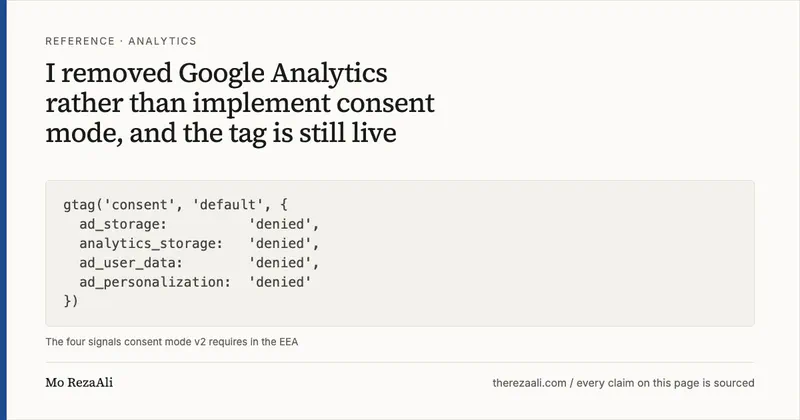
Consent mode is an API in gtag.js and Google Tag Manager. Your consent banner tells Google’s tags what the visitor agreed to, and the tags change behaviour accordingly. Google’s tag platform documentation lists seven parameters. Four matter for advertising and measurement:
ad_storage: “Enables storage, such as cookies (web) or device identifiers (apps), related to advertising.”analytics_storage: the same, “related to analytics, for example, visit duration.”ad_user_data: “Sets consent for sending user data to Google for online advertising purposes.”ad_personalization: “Sets consent for personalized advertising.”
The last two are the “v2” part. Google’s Ads Help page on EEA traffic states the requirement plainly: to keep using the tags and SDKs for measurement, ad personalization and remarketing, you must collect consent from end users based in the EEA and share those signals with Google. The Analytics-side page is blunter about the consequence of doing nothing. As of early March 2024, if you take no action, only end users outside the EEA are included in audiences used by your linked advertising products.
That is the mechanism behind the sentence this article opened with, quoted from the party that operates it.
Basic versus advanced
Google’s documentation distinguishes two implementations, and the difference is the entire compliance question.
Basic mode prevents Google tags from loading at all until the visitor interacts with the banner. Nothing is transmitted to Google before that interaction. Google describes the modelling you get back as the “general model,” which is the less detailed one.
Advanced mode loads Google tags when the page opens, sets default consent states of denied, and sends cookieless pings until and unless the visitor grants consent. Google says this “enables improved modeling compared to the Basic one as it provides an advertiser-specific model.”
Advanced mode is what most agencies install, because it recovers more data. It is also the mode where a tag runs before consent. Whether the cookieless ping is lawful under Article 5(3) is a genuinely contested question, and the honest answer for a one-person site is that you should not be the person testing it. Basic mode is the conservative reading and it is the one I would pick if I ran Google tags at all.
The correct minimal implementation
If you do run it, the ordering matters more than the syntax. The default call has to execute before the Google tag loads, or the tag has already acted.
<!-- 1. Defaults. Must run BEFORE gtag.js is requested. -->
<script>
  window.dataLayer = window.dataLayer || [];
  function gtag(){dataLayer.push(arguments);}

  gtag('consent', 'default', {
    'ad_storage':        'denied',
    'ad_user_data':      'denied',
    'ad_personalization':'denied',
    'analytics_storage': 'denied',
    'wait_for_update':   500
  });
</script>

<!-- 2. The Google tag. -->
<script async src="https://www.googletagmanager.com/gtag/js?id=TAG_ID"></script>
<script>
  gtag('js', new Date());
  gtag('config', 'TAG_ID');
</script>
wait_for_update gives an asynchronous banner a window, in milliseconds, to answer before the tag proceeds on the defaults.
Then, and only from inside the banner’s accept handler:
gtag('consent', 'update', {
  'ad_storage':        'granted',
  'ad_user_data':      'granted',
  'ad_personalization':'granted',
  'analytics_storage': 'granted'
});
The default call also takes a region array of ISO 3166-2 codes, so you can deny by default in the EEA and behave differently elsewhere. I would not bother. One default, denied everywhere, is fewer branches to get wrong.
The part that is not code
Here is why I stopped. Google’s own EU user consent policy (the policy your account is bound by, separate from the tag documentation) requires that you obtain consent for “the use of cookies or other local storage where legally required” and for “the collection, sharing, and use of personal data for personalization of ads.” It then requires you to “retain records of consent given by end users,” to “provide end users with clear instructions for revocation of consent,” and to “clearly identify each party that may collect, receive, or use end users’ personal data.”
Read that as an engineering backlog for a personal site:
- A banner with a reject button no harder to press than accept.
- A consent record store: what was consented to, when, under which banner version, retained and retrievable.
- A withdrawal UI reachable from every page, plus the logic to actually revoke and delete.
- A privacy policy naming Google as a recipient, listing the purposes, and stating retention.
- Ongoing maintenance of all four as the policies change.
Every item is real work, and every item is a place a solo operator ships a bug that nobody reviews. The value I was getting in exchange was a pageview count. That trade is bad, and it stays bad no matter how well I implement it.
Cookieless alternatives, as documented by their vendors
I checked these against the vendors’ own pages rather than comparison posts.
Cloudflare Web Analytics. Two documents, five and a half years apart. The launch post of 29 September 2020 says “We don’t use any client-side state, like cookies or localStorage, for the purposes of tracking users,” and, immediately after, “we don’t ‘fingerprint’ individuals via their IP address, User Agent string, or any other data for the purpose of displaying analytics.” The current documentation for the beacon that actually executes in your visitor’s browser, last updated 16 April 2026, is narrower and therefore more useful to check against: “The RUM beacon script does not store any data in the browser or access any storage data, such as cookies, localStorage, sessionStorage, IP address, or IndexedDB.”
Two things to know before you reach for it. Cloudflare’s “visit” is defined as “a successful page view that has an HTTP referer that doesn’t match the hostname of the request,” which is not a session and should not be read as one. And on the free plan the beacon is switched on for you with Europe carved out. The docs say “Free customers have RUM enabled automatically, with EU traffic excluded, and can switch it off if they prefer.” For a site whose readers are mostly in the EEA, that is most of the audience missing by default.
Plausible. The data policy states “We don’t use cookies, we don’t generate persistent identifiers and we don’t collect or store personal data that can be used to identify individuals,” and “Raw IP addresses and User-Agent data are never stored.” Daily uniques are counted with hash(daily_salt + website_domain + ip_address + user_agent), with the salt rotating every 24 hours. Plausible states you do not need cookie banners for analytics with it.
Fathom. The data page states “Our technology doesn’t use cookies, so you won’t need an annoying cookie consent banner,” and that raw IP addresses are stored only for security purposes and are not part of customer data exports. Fathom describes EU Isolation, launched in late 2021 following the Schrems II ruling, under which EU visitors’ IP addresses do not touch US-controlled infrastructure.
Some caveats I am not going to paper over. Dropping cookies removes the Article 5(3) storage-and-access trigger, and that is all it does; whether processing an IP address to derive a country needs its own lawful basis under the GDPR is a separate question that none of the paragraphs above answer. Everything in them is also a company describing itself, quoted by me, which is evidence of what a vendor has committed to in public and is not a legal opinion about whether the commitment is sufficient.
And none of the three gives you Google Ads conversion tracking. If you run paid acquisition, consent mode is not optional for you and the conclusion of this article does not transfer.
The decision, and what has not happened yet
I can be specific about what getting this wrong costs because I got it wrong here, at length, and (at the moment I am writing this) am still getting it wrong.
This domain runs a Google Analytics 4 tag. Property G-XMEW7KSTQD, declared in
config.yaml, served from a host in Italy to visitors who are mostly in Europe,
and it has been running for months with no consent banner, no consent mode
implementation and no privacy policy behind it. Checking took one command:
curl -s https://therezaali.com/ | grep -c -E 'consent|denied'
# 0
Zero. Not a misconfigured banner, and not a banner defaulting to granted. Nothing at all. The tag loads, sets its cookie and reports, and has done every day for months. I have spent working hours advising other people on measurement setups while my own site fails at the first line of the rule.
So I took the tag out of the build. G-XMEW7KSTQD is gone from config.yaml and from every template in this rebuild, which ships no analytics of any kind: nothing setting a cookie, nothing writing to localStorage, no third-party script at all. The privacy page states what is collected and by whom.
Now the part it would be easy to leave out.
This article is written on a branch that has not been deployed. At the time of writing, the live therezaali.com still serves the GA4 tag, still with no consent banner, exactly as described in the section above. So do not take my word for either half of that:
curl -s https://therezaali.com/ | grep -c -iE 'gtag|googletagmanager'
Running it while writing this paragraph printed 4. grep -c -E 'consent|denied' against the same page still printed 0. When this rebuild ships, the first command starts printing 0; if it ever goes back to printing anything else, something has regressed and I would like to be told. Either way the date lands on the corrections page, which is where the changes to this domain are logged rather than narrated.
Writing “I removed Google Analytics” in the present tense, on a branch, about a site still serving the tag, is the specific kind of small forward-dated lie that a reader can catch with one command. On a page arguing that claims should be checkable, getting caught on that would be deserved.
The reason to publish the failure instead of quietly fixing it is that the failure is the only part of this I can currently prove.
Sources
Every source below was opened and checked on the date shown. Links open in this tab.
- Consent mode Google Tag Platform developers.google.com Accessed 5 August 2026
- Set up consent mode on websites Google Tag Platform developers.google.com Accessed 5 August 2026
- About consent mode Google Ads Help support.google.com Accessed 5 August 2026
- Updates to consent mode for traffic in European Economic Area (EEA) Google Ads Help support.google.com Accessed 5 August 2026
- [GA4] Verify and update consent settings in Google Analytics Google Analytics Help support.google.com Accessed 5 August 2026
- EU user consent policy Google www.google.com Accessed 5 August 2026
- Directive 2002/58/EC (ePrivacy Directive), consolidated text of 19 December 2009 EUR-Lex, Publications Office of the European Union eur-lex.europa.eu Accessed 5 August 2026
- Regulation (EU) 2016/679 (General Data Protection Regulation) EUR-Lex, Publications Office of the European Union eur-lex.europa.eu Accessed 5 August 2026
- Guidelines 05/2020 on consent under Regulation 2016/679, adopted 4 May 2020 European Data Protection Board www.edpb.europa.eu Accessed 5 August 2026
- Guidelines 2/2023 on Technical Scope of Art. 5(3) of ePrivacy Directive, version 2.0, adopted 16 October 2024 European Data Protection Board www.edpb.europa.eu Accessed 5 August 2026
- Free, privacy-first analytics for a better web The Cloudflare Blog blog.cloudflare.com Accessed 5 August 2026
- Cloudflare Web Analytics Cloudflare Docs developers.cloudflare.com Accessed 5 August 2026
- RUM beacon for Web Analytics Cloudflare Docs developers.cloudflare.com Accessed 5 August 2026
- Data Policy Plausible Analytics plausible.io Accessed 5 August 2026
- Our data journey Fathom Analytics usefathom.com Accessed 5 August 2026